Assistant Files
Assistant Files API
Diese API ist ein Premium-Feature und muss fuer deine Organisation freigeschaltet werden. Kontaktiere den Support, um Zugriff zu erhalten.
Authentifizierung
Diese API verwendet User API Keys. Diese koennen in den User-Settings erstellt werden und haben das Prefix sk_meingpt_.
curl -X GET "https://app.meingpt.com/api/assistant-files/v1/assistants/{assistantId}/files" \
  -H "Authorization: Bearer $MEINGPT_API_KEY"
Berechtigungen
- Dateien auflisten / Metadaten abrufen: Erfordert
VIEW,EDIToderOWNERBerechtigung fuer den Assistenten - Dateien hochladen / ersetzen / loeschen: Erfordert
EDIToderOWNERBerechtigung fuer den Assistenten
Endpoints
API-Schlüssel zur Authentifizierung. Verwenden Sie das Format 'Bearer <Ihr-API-Schlüssel>'.
In: header
Path Parameters
Die AssistantId
Response Body
curl -X GET "https://app.meingpt.com/api/assistant-files/v1/assistants/string/files"{
"files": [
{
"id": "string",
"originalName": "string",
"mimeType": "string",
"size": 0,
"createdAt": "string",
"updatedAt": "string"
}
],
"count": 0,
"assistantId": "string"
}{
"status": "error",
"message": "string"
}{
"status": "error",
"message": "string"
}{
"status": "error",
"message": "string"
}API-Schlüssel zur Authentifizierung. Verwenden Sie das Format 'Bearer <Ihr-API-Schlüssel>'.
In: header
Path Parameters
Die AssistantId
binaryResponse Body
curl -X POST "https://app.meingpt.com/api/assistant-files/v1/assistants/string/files"{
"success": true,
"assistantId": "string",
"file": {
"id": "string",
"originalName": "string",
"size": 0,
"mimeType": "string",
"uploadedAt": "string"
}
}{
"status": "error",
"message": "string"
}{
"status": "error",
"message": "string"
}{
"status": "error",
"message": "string"
}API-Schlüssel zur Authentifizierung. Verwenden Sie das Format 'Bearer <Ihr-API-Schlüssel>'.
In: header
Path Parameters
Die AssistantId
Die DocumentId
Response Body
curl -X GET "https://app.meingpt.com/api/assistant-files/v1/assistants/string/files/string"{
"id": "string",
"originalName": "string",
"mimeType": "string",
"size": 0,
"createdAt": "string",
"updatedAt": "string",
"processingStatus": "string",
"derivations": [
"string"
],
"assistantId": "string"
}{
"status": "error",
"message": "string"
}{
"status": "error",
"message": "string"
}{
"status": "error",
"message": "string"
}API-Schlüssel zur Authentifizierung. Verwenden Sie das Format 'Bearer <Ihr-API-Schlüssel>'.
In: header
Path Parameters
Die AssistantId
Die DocumentId, die ersetzt werden soll
binaryResponse Body
curl -X PUT "https://app.meingpt.com/api/assistant-files/v1/assistants/string/files/string"{
"success": true,
"assistantId": "string",
"replacedId": "string",
"originalId": "string",
"file": {
"id": "string",
"originalName": "string",
"size": 0,
"mimeType": "string",
"uploadedAt": "string"
}
}{
"status": "error",
"message": "string"
}{
"status": "error",
"message": "string"
}{
"status": "error",
"message": "string"
}API-Schlüssel zur Authentifizierung. Verwenden Sie das Format 'Bearer <Ihr-API-Schlüssel>'.
In: header
Path Parameters
Die AssistantId
Die DocumentId
Response Body
curl -X DELETE "https://app.meingpt.com/api/assistant-files/v1/assistants/string/files/string"{
"success": true,
"assistantId": "string",
"originalId": "string"
}{
"status": "error",
"message": "string"
}{
"status": "error",
"message": "string"
}{
"status": "error",
"message": "string"
}Beim Ersetzen einer Datei wird zuerst ein neues Dokument hochgeladen und anschliessend das alte geloescht. Der Upload erhaelt dabei eine neue id.
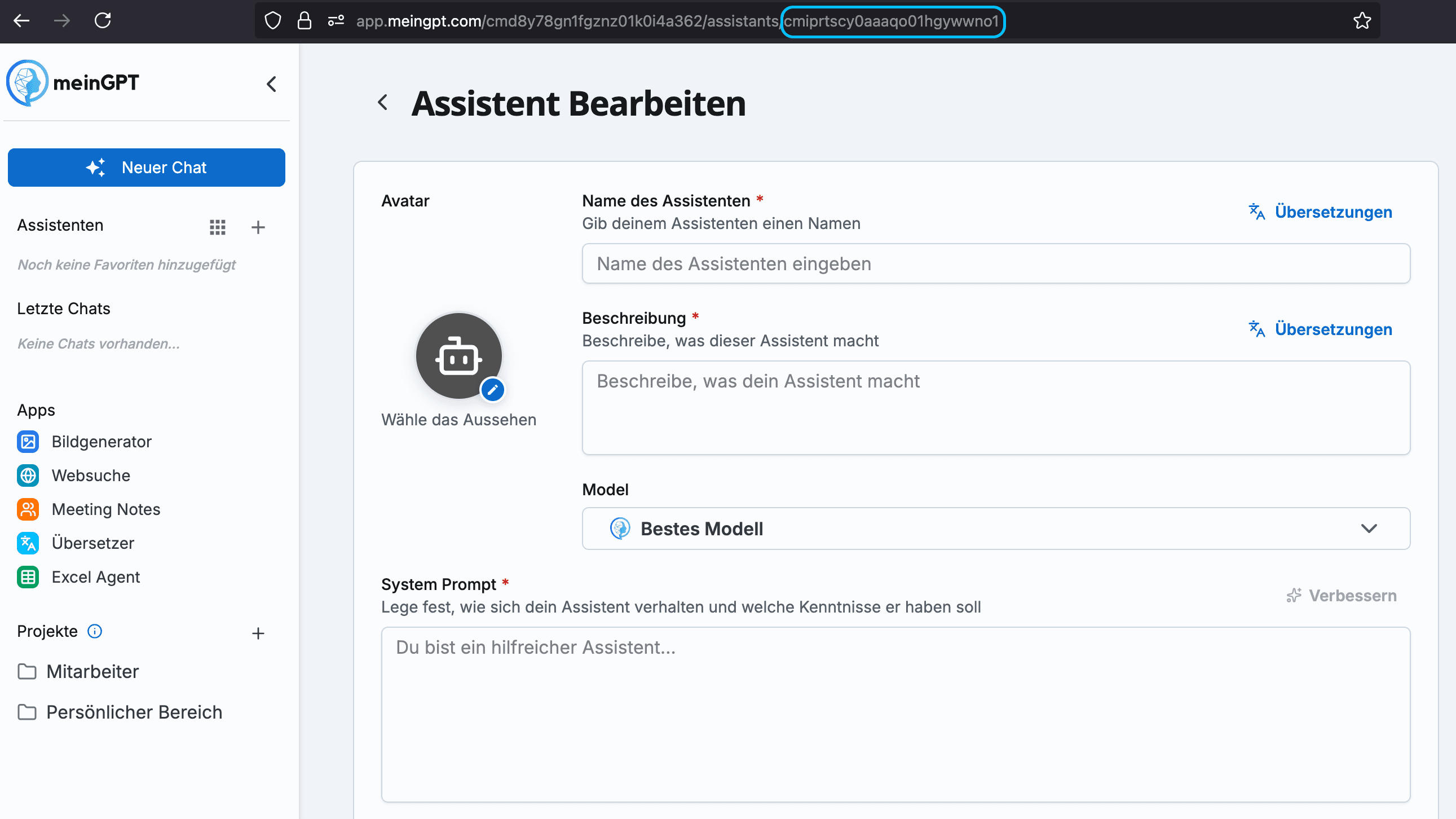
AssistantId finden
- Gehe in den Bearbeitungsmodus deines Assistenten
- In der URL findest du hinter
/assistants/die AssistantId